.png?width=40&height=40&name=Logo%20(1).png)
After 10 years of the TeamBuildr Calendar, our programming interface, we decided to start from scratch and rebuild something greater to better meet the needs of strength & conditioning coaches..png?width=831&height=376&name=New%20Calendar%20(2).png)
Current Calendar (soon to be sunset) vs. 2015 Calendar
From the very beginning, our goal has been simple: build a product that helps strength and conditioning coaches do their jobs better - saving time, staying organized, and supporting the increasingly complex demands of the profession.
The current Calendar has done exactly that for thousands of coaches around the world by supporting programs at every level, from high school and private facilities to collegiate and professional sport. Over time, the strength and conditioning landscape has continued to expand and evolve - and while TeamBuildr grew alongside it, there was only so much we could continue to build on top of the existing foundation.
With years of real-world usage and feedback from coaches across the industry, our existing calendar's foundation was not able to take on the new demands. So we rebuilt the core programming experience from the ground up with a clear focus:
-
Make core interactions faster and more streamlined
-
Keeping everything you’ve already built (workouts, exercises, etc.) working exactly as before
-
Support both date-based programming and free-form (non-date-based) workflows
The result is a new foundation that still includes everything you know and rely on in TeamBuildr today, while giving us the flexibility to move faster and expand in ways that simply weren’t possible before.
This next iteration is now known as Build.
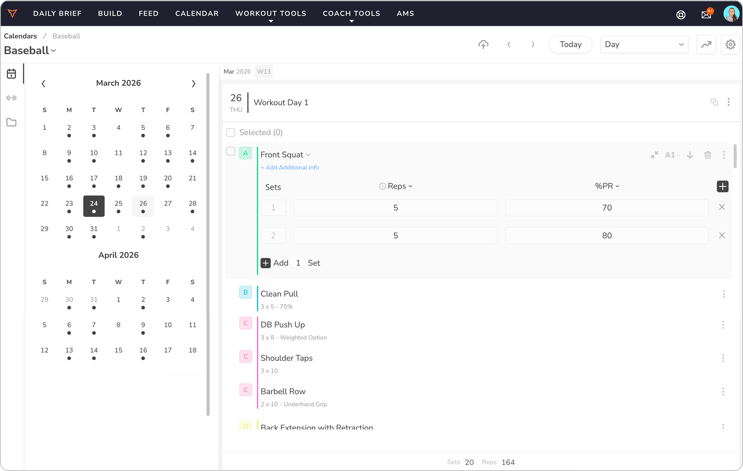
Key Features Include:
-
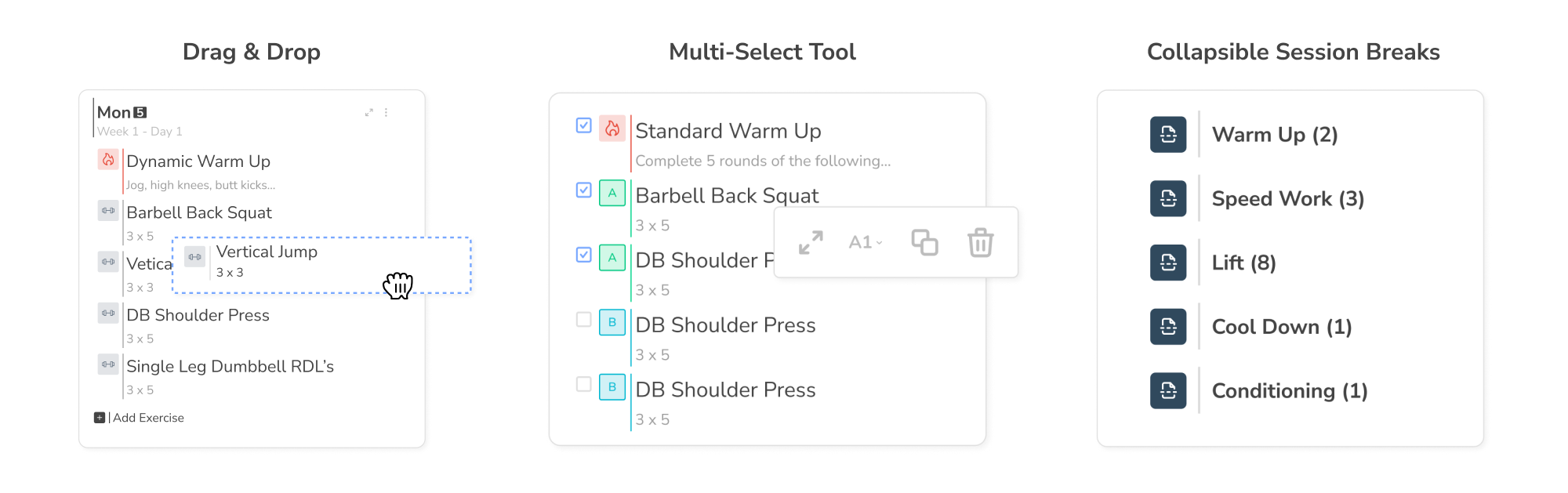
Drag & Drop: Easily drag and drop exercises, questionnaires, or entire program sections.
- Undo Function (Beta): Quickly restore deleted workout items in case of accidental removal.
-
Multi-Select Tool: Manage, copy, or delete whole segments or specific specific pieces of your workout.
-
Collapsible Session Breaks: Keep your workouts tidy and structured with the collapsable session breaks.
- Day Stacking: See your week the way you want to. Hide days you’re not using or stack all your “Mondays” side-by-side.
-
Faster Programming: Quickly add comma-separated reps, custom percentages of 1RM, tempos, and supersets.
-
Various Programming Environments: Create programs by using dates on the calendar or in our dateless environment.
-
Editable Workout Templates: Make changes to any workout program and it will update the occurrences for each athlete assigned to that program.
.png?width=2000&height=629&name=Blog%20Features%20(2).png)
Whether you’re programming on a traditional calendar or creating workouts outside of a schedule, Build is where programs come together. It represents a more flexible, future-ready approach to programming while staying true to the workflows coaches already trust.
All of this was built with one goal in mind: to better serve you, helping you save time, stay organized, and make programming simpler and more effective than ever.
Build Game-Breaking Speed With This Exercise

How to Build a Remote Training System for Tactical Athletes